Order Delivery Date for WP e-Commerce – Pro
from $29.00
Plugin Details
Plugin Version: 2.3
Last Updated Date: April 24 2013
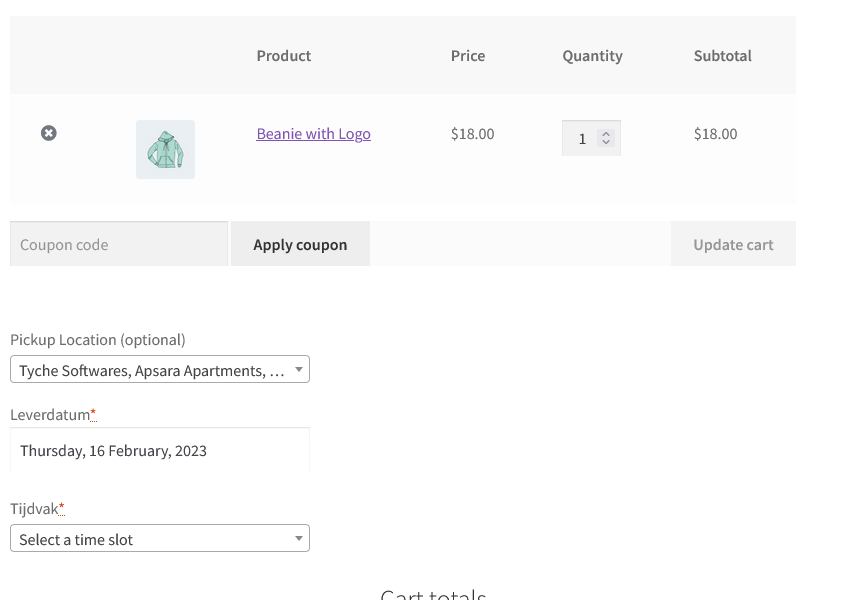
This plugin will allow the customer to choose a delivery date & time on the checkout page. Order delivery settings allow the site owner to decide which dates should be made available for delivery. The delivery date & time will be visible to the site administrator while viewing the order.
Video Tour
Screenshots
- WP e-Commerce Checkout Page
- Order Details
- Date Settings
- Time Settings
- Holidays / Black-out dates
- Calendar Appearance
- Specific Delivery Dates
Details
The customer can choose any delivery date that is after the current date. The delivery date chosen by the customer will be visible to the site administrator while viewing the order under the "Additional Checkout Fields" section.
NEW: With the version 2.3, the delivery date calendar can be displayed in 62 DIFFERENT LANGUAGES on the checkout page. In addition to that, v 2.3 contains 5 new date formats.
In addition to the above, the plugin now includes the automatic updater. So all future updates from the v 2.3 onwards can be automatically pulled from the 'Plugins' page as & when they are available.
You can now schedule delivery dates for gifts, allowing them to be delivered at a certain date in the future. This should make holiday and birthday shopping super easy for your customers.
This plugin can also be used to enable only selected delivery dates instead of weekdays. Many businesses deliver on selected delivery dates only & not on recurring weekdays. The "Delivery Dates" section enables them to add the dates which they deliver on. Enabling the "Delivery Dates" option automatically disables the weekdays.
This plugin can also be used as a Booking Calendar on the checkout page. A new setting in the latest version allows you to set maximum bookings or appointments that you want to conduct in 1 day. The customizable field label & note will infact enable you to use this plugin to capture any future dates, for example, booking date, pickup date, delivery date, etc.
This plugin enables Customers to:
- Select convenient delivery date
- Select appropriate delivery time
- Book appointments - Version 2.1
This plugin enables Admin to:
- Allow the customer to select Delivery Time along with Delivery Date
- Same-day & Next-day delivery with cut-off time
- Specify the time range available for delivery
- Set minimal interval between the order and delivery date
- Add holidays or black-out dates to the calendar
- Option to show Delivery Date in Customer Notification Email
- See delivery date & time entered by Customer in the order
- Choose from 24 different themes for the calendar
- Choose the convenient date format
- Customize field label, field note text
- Capture only delivery date or only delivery time or both
- Set maximum deliveries / appointments / bookings for a day - Version 2.1
- Set Specific Delivery Dates for delivery instead of Weekdays - VERSION 2.2
- Send Delivery Date in Admin Notification emails - VERSION 2.2
- Show Calendar in one of 62 languages - VERSION 2.3
Benefits
- Deliver your orders on-time
- Use this plugin as a Booking calendar
Compatibility
- WP e-Commerce 3.8 ready
- WP e-Commerce 3.7 ready
Installation
You just need to activate this plugin & the delivery date field will appear on the checkout form. Deactivating the plugin will hide the field from the checkout form as well as from the admin order page.
FAQ
- Can the customer enter the preferred order delivery time?
Currently there is no provision for entering the delivery time. This is planned in future release. - Is the order delivery date field mandatory on checkout page?
No. The field is optional.
Updates
Version 2.2
- Feature: Added Specific Delivery Dates feature
- Feature: Delivery date in Admin notification email & on Order Received page.
- Bug: Delivery date not appearing in Customer notification email. This has been fixed in 2.2
Version 2.1
- Added the setting "Lockout date after X orders:"
- Updated the datepicker code to work with the Abundance theme & Bellissima theme.
To get the latest version of your plugin, drop an email to updates@tychesoftwares.com with your name, email address & plugin name. The updated version of the plugin will be emailed to you upon verification. The plugin update process will be automated very soon.
Upcoming features
- Ability to choose delivery / appointment timeslot from the checkout page
- Separate delivery / appointment time range for all 7 days
Support
You can request support from the Contact page.


Hi, When i activate this plugin all of the options in the back end of wordpress seem to fall out of line e.g none of the check boxes are lined up (see image). Is there a fix for this?
Thanks
http://postimage.org/image/5x8z80c9l/
You are using the free version or the PRO version of the plugin? There was an issue a few days back which caused the Settings page to fall out of line, but that one was fixed.
Incase you have downloaded the free version before 25th October 2012, then I would suggest you download the updated version from http://wordpress.org/extend/plugins/order-delivery-date/
or you can download it from the website too at http://www.tychesoftwares.com/store/free-plugins/order-delivery-date-on-checkout
I tried the free version, with WP e-Commerce 3.8.9.5 and WP 3.5, but it’s not worked.
Firebug error message:
Error: TypeError: $.effects.effect is undefined
Sourcefile: http://domain.tld/wp-includes/js/jquery/ui/jquery.ui.datepicker.min.js?ver=1.9.2
Line: 5
Please fix it! I want to buy pro version, but if free version not work…
Which theme are you using? This error is not always caused due to the plugin itself, it could be some other plugin, which has been the case in the past. The PRO version uses a different set of files in addition to the above one. It has been updated 3 days back. I would be happy to fix the issue in the free version too if you can provide the details.
In any case, if you buy the PRO version & it fails to work, you are entitled for a full refund.
Hello,
I was wondering if I can add this to two locations on the checkout page. Like an check in date and a check out date situation?
Thank you.
That is not available by default in the plugin. The second field will need to be added (as custom work) separately to modify the plugin.
Thank you for the response. I’ll give it a shot.
Cool. Thank you.
Hi, this is a great plug-in!
However I’m wondering if it’s possible to translate it (front-end)?
Thank you for the appreciation. It is possible to translate the front-end calendar by adding a couple of lines in the code. The next update would contain the ability to choose the calendar language from the Appearance settings. It will be out by this week or next week.
That is awesome! Thanks for your response.
Hi Ashok, how’s the update coming along? I don’t mean to rush you, just curious
Hey Pontus, the update is coming along nicely. We are on the last round of testing (I am testing it). The WPEC plugin update might be a little delayed due to an issue that we are facing with adding the delivery date information in the notification emails. So we will release the Woocommerce delivery date plugin update first, and then WPEC update.
Hi Ashok, I’ve bought the plugin and selected the different options. I can see that the delivery date option on my website but when I select the calendar does not appear. I followed the instructions on the video, but it doesn’t help. Is there anywhere else that you can enable something? Thank you.
Hi Dorothea, thank you for purchasing the plugin. Once you have set the options, the calendar should appear on the website. Can you give me the link to your website so I can check what is going wrong? Please also let me know the version of WP eCommerce, WordPress. Also let me know the theme you are using.
You can drop me an email about it on ashok@tychesoftwares.com