


Providing autocomplete orders for coupons eliminates manual order processing, thereby saving time for both customers and WooCommerce Store owners. Since the order gets completed almost instantly, using coupons becomes very convenient for the shoppers and it also encourages them to come back and shop again. Let’s see how to utliize autocompleting orders when a coupon is used in your WooCommerce store via WooCommerce customization.
Solution: Autocomplete Orders When a Coupon is Used
This code ensures that orders are automatically marked as ‘completed’ when coupons are applied during checkout.
add_action('woocommerce_checkout_update_order_meta', 'ts_custom_woocommerce_auto_complete_order');
function ts_custom_woocommerce_auto_complete_order($order_id)
{
    if (!$order_id) {
        return;
    }
    $order = wc_get_order($order_id);
    // Check if any coupons have been applied to the order
    $applied_coupons = $order->get_coupon_codes();
    if (!empty($applied_coupons) && $order->get_total() > 0) {
        // If coupons are applied and the order total is greater than 0, complete the order
        $order->update_status('completed');
    }
}
Output
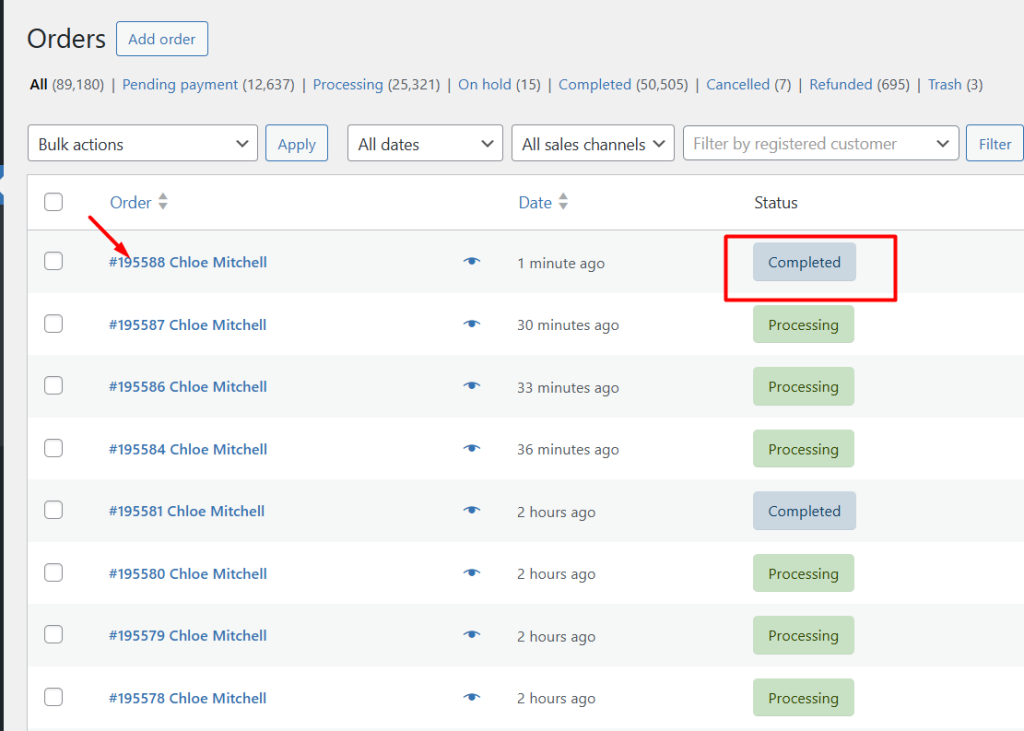
When a customer applies any coupon during checkout, then those orders will be automatically set to the ‘completed’ status.

Autocomplete Orders for a Specific Coupon in WooCommerce
If you run multiple promotions in your WooCommerce store, you might want orders to be automatically completed only when a specific coupon code is used. Doing this reduces manual checks and speeds up the order flow for trusted promotions.
In this guide, we’ll show you how to automatically complete WooCommerce orders only when a specific coupon is applied.
add_action('woocommerce_checkout_update_order_meta', 'ts_autocomplete_specific_coupon_order');
function ts_autocomplete_specific_coupon_order($order_id) {
    if (!$order_id) {
        return;
    }

    $order = wc_get_order($order_id);
    $applied_coupons = $order->get_coupon_codes();

    // Define the specific coupon code
    $specific_coupon = 'DISCOUNT10'; // Change this to your coupon code

    // Check if the specific coupon is applied
    if (in_array($specific_coupon, $applied_coupons) && $order->get_total() > 0) {
        $order->update_status('completed');
    }
}
Output
When a customer applies the coupon code DISCOUNT10 during checkout, the order is automatically marked as Completed status after checkout.
On the order confirmation page shown below, you can see Cash on Delivery as the payment method, and the DISCOUNT10 coupon is applied.

Let’s go to the WooCommerce → Orders page, and the same order is marked with the status set to Completed instead of the default Processing order status.
Just like the autocompletion feature for order status, you can also customize the order status based on the total amount of the order. This customization ensures that orders are changed to ‘processing’ status based on order value.

How would you change this, if you only want to auto-complete it when a specific coupon is used? Or better even, when one of the coupons is used where you want it to auto-complete.
Hi Bram,
We’ve updated the blog post based on your request. You can find the code under the heading “Autocomplete Orders for a Specific Coupon in WooCommerce.” For multiple coupons, the approach is to use an array of coupon codes and verify if any of them are applied.