


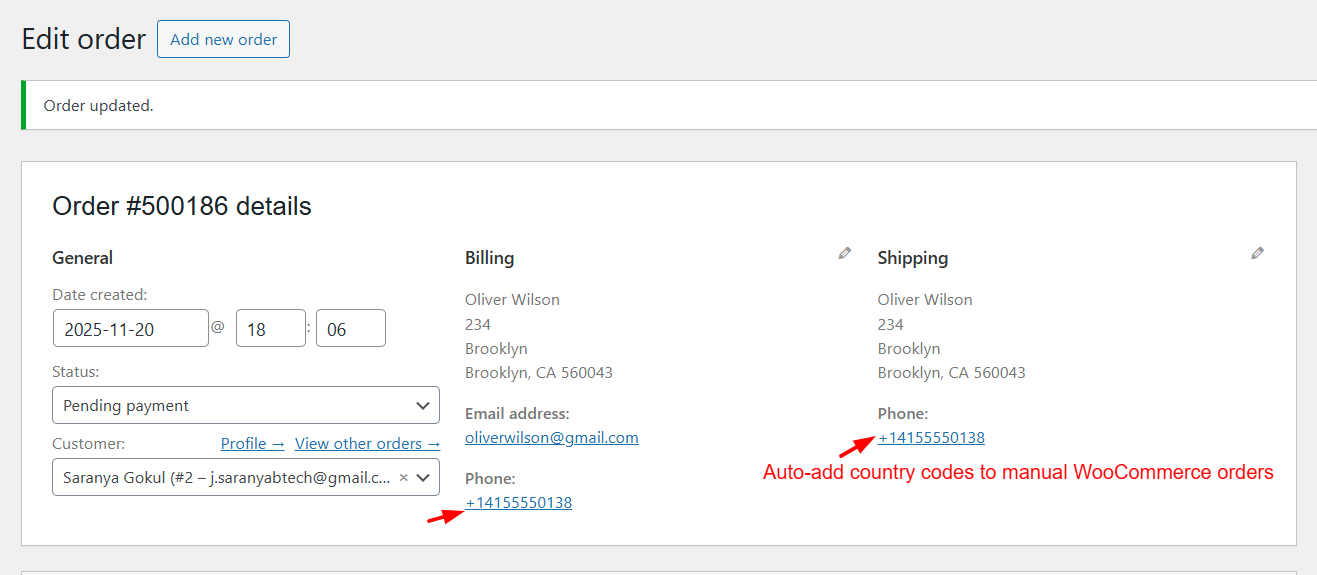
When creating WooCommerce orders manually from the admin panel, store owners often forget to include the international country code in customer phone numbers.
Missing country codes can cause problems when sending SMS notifications, integrating with CRMs, or exporting order data.
In this guide, we’ll show you how to automatically append the correct country code to both billing and shipping phone numbers. The snippet is fully compatible with HPOS order tables.
Solution:
The snippet below ensures that any phone number entered in the WooCommerce admin order form when creating orders manually will be automatically formatted with the correct country code.
/**
 * Add country calling code to billing/shipping phone
 * Works with HPOS + Classic Orders
 */
add_action( 'woocommerce_after_order_object_save', 'ts_add_calling_code_after_save', 20, 2 );

function ts_add_calling_code_after_save( $order, $data_store ) {

    // Only run in wp-admin (manual order creation/edit)
    if ( ! is_admin() ) {
        return;
    }

    // Prevent infinite loops when saving the order again
    if ( did_action( 'ts_phone_update_once' ) ) {
        return;
    }

    $billing_phone   = $order->get_billing_phone();
    $billing_country = $order->get_billing_country();

    if ( empty( $billing_phone ) || empty( $billing_country ) ) {
        return;
    }

    // Get correct WooCommerce calling code
    $calling_code = WC()->countries->get_country_calling_code( $billing_country );

    if ( empty( $calling_code ) ) {
        return;
    }

    // Remove spaces, hyphens, parentheses
    $clean_phone = preg_replace( '/[\s\-\(\)]/', '', $billing_phone );

    // Remove leading zero for countries where local numbers start with 0
    $zero_countries = array( 'GB', 'AU', 'IE', 'NZ' ); // Add more as needed
    if ( in_array( $billing_country, $zero_countries ) && strpos( $clean_phone, '0' ) === 0 ) {
        $clean_phone = ltrim( $clean_phone, '0' );
    }

    // If already starts with "+<code>", do nothing
    if ( preg_match( '/^\+' . preg_quote( $calling_code, '/' ) . '/', $clean_phone ) ) {
        return;
    }

    // If starts with "<code>" without "+", prepend the "+"
    if ( preg_match( '/^' . preg_quote( $calling_code, '/' ) . '/', $clean_phone ) ) {
        $clean_phone = '+' . $clean_phone;
    } else {
        // Otherwise prepend full international dialing code
        $clean_phone = '+' . $calling_code . $clean_phone;
    }

    // enforce exactly ONE "+"
    $clean_phone = preg_replace( '/^\++/', '+', $clean_phone );

    // Avoid saving if no changes
    if ( $clean_phone === $billing_phone ) {
        return;
    }

    // Save HPOS/classic compatible
    $order->set_billing_phone( $clean_phone );
    $order->set_shipping_phone( $clean_phone );

    do_action( 'ts_phone_update_once' ); // Prevent recursion on save()

    $order->save();
}
Output
After adding the snippet, any phone number entered manually in the WooCommerce admin will be automatically formatted with the correct country code.
If you’re looking to enhance your admin workflows even further, you might also explore ways to surface important customer details directly where you need them, such as adding phone numbers or email to your WooCommerce Order IDs. Customizations like these help build a more efficient, admin-friendly WooCommerce dashboard.
