


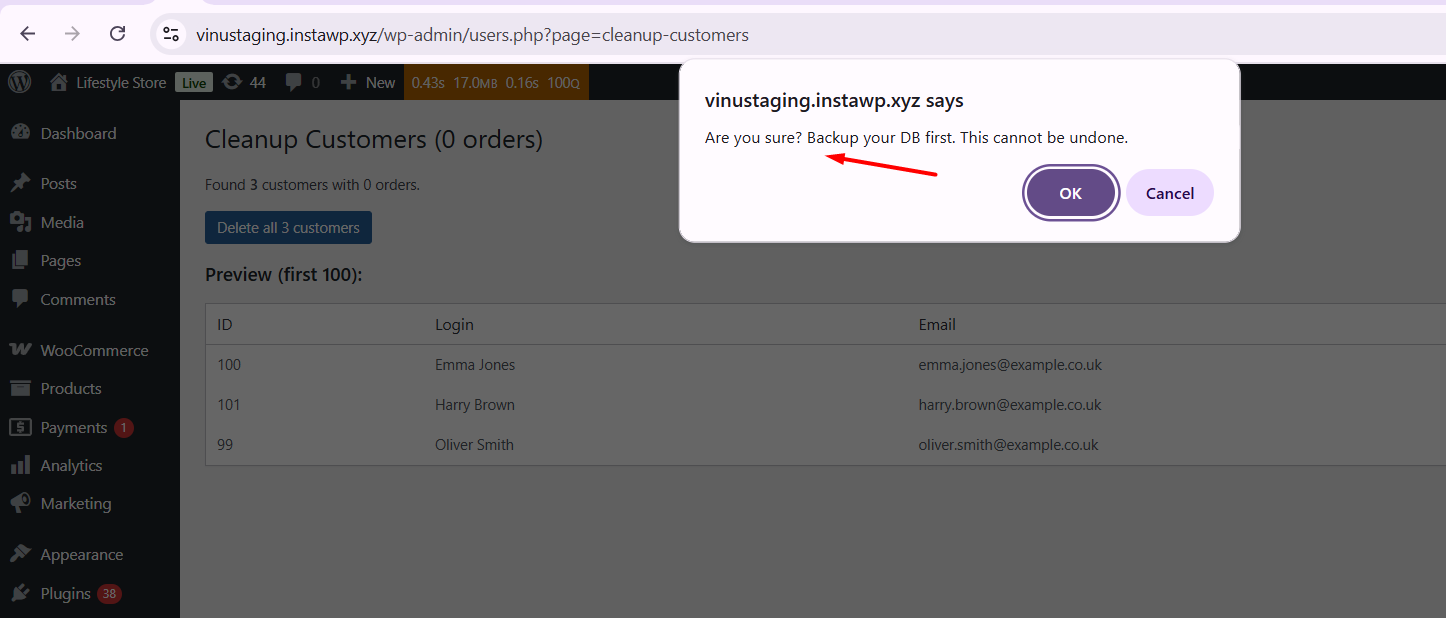
Managing your WooCommerce store involves numerous tasks, and one of those tasks is maintaining a clean database. Over time, stores accumulate customers who have never placed an order. While these inactive accounts don’t generate revenue, they still take up space in the database. As the number of such users grows, it can lead to database bloat and slow down your WooCommerce site.
To improve your WooCommerce store’s performance, it’s essential to identify and remove these inactive customers. One effective approach is to create a custom admin page that lists and safely deletes customers with zero orders.
On the contrary, if you’re managing a busy store with thousands of orders, a tool like Flexi Archiver can help archive old order data and improve overall site performance.
Solution: Delete WooCommerce Customers With Zero Orders
This code creates a new “Cleanup Customers” page under the Users menu in the WordPress admin dashboard. It allows administrators to identify WooCommerce customers with 0 orders and safely delete them in bulk.
add_action('admin_menu', 'ts_add_cleanup_customers_page');
function ts_add_cleanup_customers_page() {
    add_users_page(
        'Cleanup Customers',
        'Cleanup Customers',
        'manage_options',
        'cleanup-customers',
        'ts_cleanup_customers_page'
    );
}

function ts_cleanup_customers_page() {

    if (! current_user_can('manage_options')) {
        wp_die('Insufficient permissions');
    }

    echo '<div class="wrap"><h1>Cleanup Customers Page</h1></div>';
    echo '<p>This page lists customers with 0 orders in small batches to prevent performance issues.</p>';

    $per_page  = 100;
    $paged     = isset($_GET['paged']) ? max(1, intval($_GET['paged'])) : 1;
    $offset    = ($paged - 1) * $per_page;

    $customer_query = new WP_User_Query([
        'role'   => 'customer',
        'fields' => ['ID', 'user_login', 'user_email'],
        'number' => $per_page,
        'offset' => $offset,
    ]);

    $customers = $customer_query->get_results();
    $no_orders_customers = [];

    // Check each customer
    foreach ($customers as $user) {
        $orders = wc_get_orders([
            'customer_id' => $user->ID,
            'limit' => 1
        ]);

        if (empty($orders)) {
            $no_orders_customers[] = $user;
        }
    }

    echo '<h2>Customers with No Orders (Batch ' . $paged . ')</h2>';

    if (!empty($no_orders_customers)) {

        // Scrollable container
        echo '<div style="max-height: 400px; overflow-y: auto; margin-bottom: 20px; border: 1px solid #ccd0d4; padding: 10px; border-radius: 4px; background: #fff;">';

        echo '<table class="widefat"><thead><tr>
            <th>ID</th><th>Login</th><th>Email</th></tr></thead><tbody>';

        foreach ($no_orders_customers as $user) {
            echo '<tr>
                <td>'.esc_html($user->ID).'</td>
                <td>'.esc_html($user->user_login).'</td>
                <td>'.esc_html($user->user_email).'</td>
            </tr>';
        }

        echo '</tbody></table>';

        echo '</div>'; // end scrollable box

        // Delete button always visible
        echo '<form method="post" style="margin-top: 20px;">';
        wp_nonce_field('ts_cleanup_action', 'ts_cleanup_nonce');

        echo '<p><input type="submit" class="button button-primary"
            name="ts_delete_batch" value="Delete This Batch"
            onclick="return confirm(\'Are you sure you want to delete all customers in this batch?\');"></p>';

        echo '</form>';

        // Handle delete
        if (isset($_POST['ts_delete_batch'])) {
            check_admin_referer('ts_cleanup_action', 'ts_cleanup_nonce');

            foreach ($no_orders_customers as $user) {
                wp_delete_user($user->ID);
            }

            echo '<div class="notice notice-success"><p>Batch deleted successfully!</p></div>';
        }

    } else {
        echo '<p>No zero-order customers in this batch.</p>';
    }
}
Output
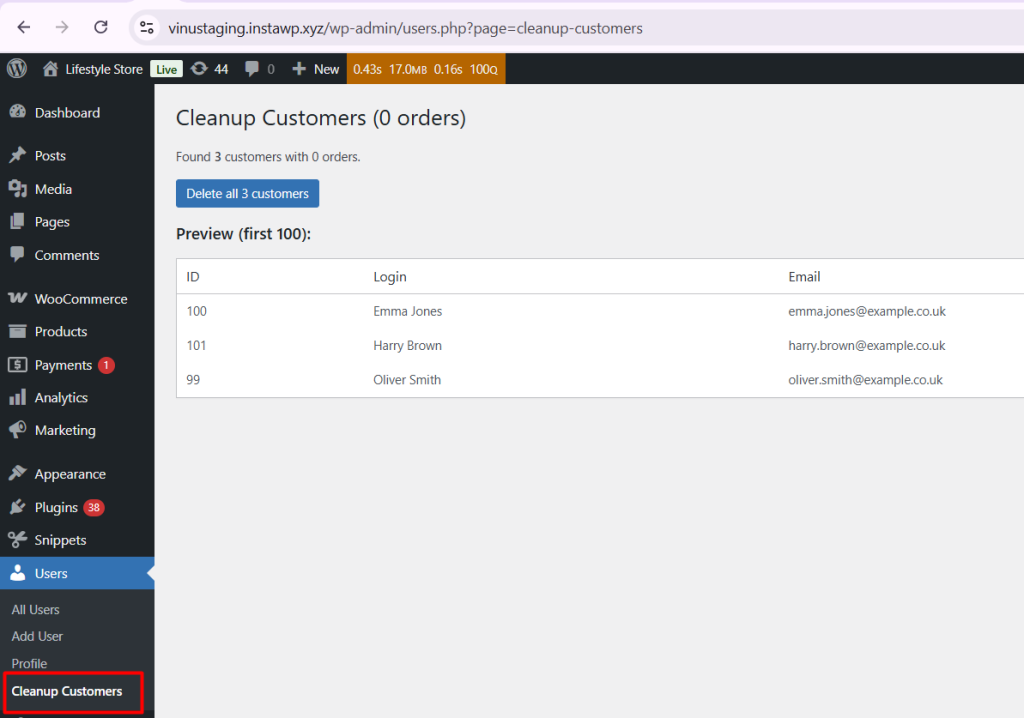
When the admin opens the Cleanup Customers page from Users → Cleanup Customers, they see a list of customers who have never placed an order, including their ID, username, and email.
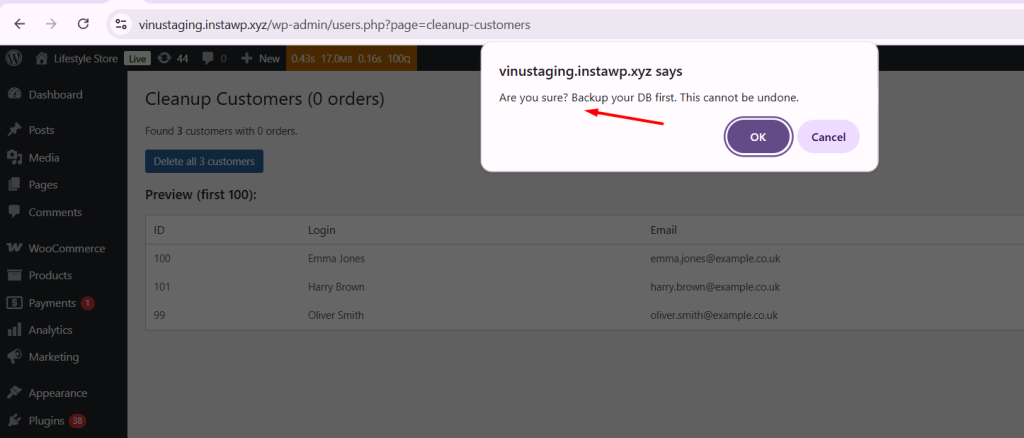
If customers with zero orders are present, a “Delete all customers” button is displayed. Clicking this button triggers a confirmation prompt, ensuring the admin wants to proceed before permanently deleting users.
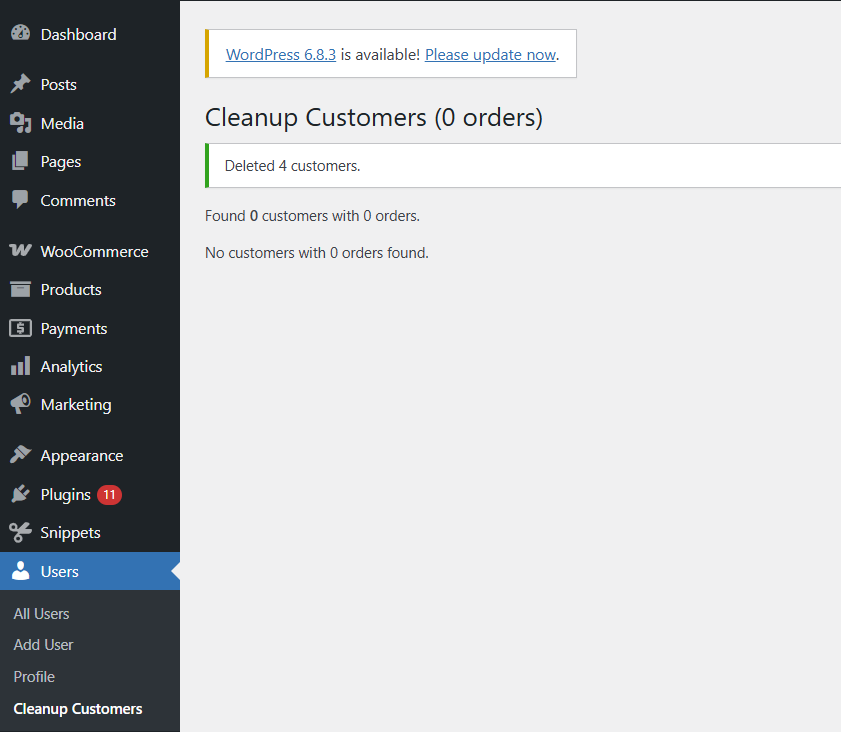
If there are no customers with 0 orders, the page shows a friendly message:
“No customers with 0 orders found.”
Before deleting customer or order data, it’s important to understand how WooCommerce handles it behind the scenes. Removing orders or customers incorrectly can affect your store’s database and overall performance.
To learn more about what actually happens when orders are deleted and how to keep your store data safe, check out our detailed guide on what happens when you delete an order in WooCommerce?

It works! Thanks.
Awesome! You’re welcome
This is exactly what I need but doing that crashes the site. Perhaps too many results. Is there a way to batch this?
Yes, on a site with a large number of customers and orders, trying to delete all zero-order customers at once can easily crash the site. This happens because everything gets processed in a single page load, creating a huge memory and performance spike. To avoid this, we have implemented a batch approach that processes customers with zero orders in smaller batches instead of all at once. The code in the blog post has been updated to work fine for larger stores as well. Each batch lists 100 zero-order customers, and you simply need to click the “Delete This Batch” button:… Read more »
Thanks for doing that. We currently have 25 thousand in on website that has a combination of reasons why users don’t have orders. I will test the process you have given and let you know how it goes.
Thanks, Phil! Since you mentioned that the site has around 25,000 customers as a result of a combination of reasons ending up with zero orders, this batch-based cleanup should still work well, because it simply checks whether the customer has at least one order — regardless of the underlying reason.
Please go ahead and run the batch cleanup, and if you notice any cases that don’t get handled as expected, feel free to share the details — I’ll be happy to help fine-tune the solution for your setup.
It worked as expected. The batch list stays in place after the deletion however which was a little confusing. Got it sorted and now it will only be needed occasionally.
Thanks again.
This is a website that went live as soon as Woocommerce was released in 2011.
First order was Dec 7, 2011
Wow, that’s amazing! Glad it worked as expected.
This brought in all my customers
Hi Justin,
Please make sure to test the code with the latest WooCommerce version (10.1.2). I’ve also updated the code to use WooCommerce’s built-in function for checking customer orders, which now makes it more accurate and compatible with all WooCommerce versions.